<?xml version="1.0" encoding="utf-8"?><feed xmlns="http://www.w3.org/2005/Atom" ><generator uri="https://jekyllrb.com/" version="3.10.0">Jekyll</generator><link href="http://www.wtian.net/feed.xml" rel="self" type="application/atom+xml" /><link href="http://www.wtian.net/" rel="alternate" type="text/html" /><updated>2026-05-29T15:52:20+00:00</updated><id>http://www.wtian.net/feed.xml</id><title type="html">TW(桃花谷主)</title><subtitle>Software and Electrical Engineer</subtitle><entry><title type="html">MIME issue with flask or Django web application</title><link href="http://www.wtian.net/MIME-problem-with-flask-or-Django-CSS/" rel="alternate" type="text/html" title="MIME issue with flask or Django web application" /><published>2017-09-07T22:31:26+00:00</published><updated>2017-09-07T22:31:26+00:00</updated><id>http://www.wtian.net/MIME%20problem%20with%20flask%20or%20Django%20CSS</id><content type="html" xml:base="http://www.wtian.net/MIME-problem-with-flask-or-Django-CSS/"><![CDATA[<p>The web app developed with Flask or Django could not display properly in window enviroment while no issue in Mac or Linux.
windows-&gt;run-&gt;regedit-&gt; delete the key and value related .css in “\HKey_Classses_Root.css”.
Restart the web app, and it should work fine now.</p>

<p>referrence
https://stackoverflow.com/questions/13772884/css-problems-with-flask-web-app</p>]]></content><author><name></name></author><category term="python" /><summary type="html"><![CDATA[The web app developed with Flask or Django could not display properly in window enviroment while no issue in Mac or Linux. windows-&gt;run-&gt;regedit-&gt; delete the key and value related .css in “\HKey_Classses_Root.css”. Restart the web app, and it should work fine now.]]></summary></entry><entry><title type="html">Ubuntu Nginx Flask Uwsgi boot precdure</title><link href="http://www.wtian.net/ubuntu-nginx-flask-uwsgi-boot-procedure/" rel="alternate" type="text/html" title="Ubuntu Nginx Flask Uwsgi boot precdure" /><published>2017-08-18T22:31:26+00:00</published><updated>2017-08-18T22:31:26+00:00</updated><id>http://www.wtian.net/ubuntu-nginx-flask-uwsgi-boot-procedure</id><content type="html" xml:base="http://www.wtian.net/ubuntu-nginx-flask-uwsgi-boot-procedure/"><![CDATA[<ol>
  <li>Nginx: sudo service nginx start</li>
  <li>virtualenv: source activate</li>
  <li>uwsgi –ini *_uwsgi.ini</li>
</ol>

<p>Whenever the html or python code is modified, uwsgi needs to be restarted, if not, the change would not shown on browser.
nginx don’t need to resart.</p>]]></content><author><name></name></author><category term="ubuntu" /><summary type="html"><![CDATA[Nginx: sudo service nginx start virtualenv: source activate uwsgi –ini *_uwsgi.ini]]></summary></entry><entry><title type="html">Don’t change the default python version in ubuntu</title><link href="http://www.wtian.net/Don't-the-change-the-default-python-version-in-ubuntu/" rel="alternate" type="text/html" title="Don’t change the default python version in ubuntu" /><published>2017-08-14T17:09:26+00:00</published><updated>2017-08-14T17:09:26+00:00</updated><id>http://www.wtian.net/Don&apos;t%20the%20change%20the%20default%20python%20version%20in%20ubuntu</id><content type="html" xml:base="http://www.wtian.net/Don&apos;t-the-change-the-default-python-version-in-ubuntu/"><![CDATA[<p>Don’t change the default python version (python 2) in ubuntu to the last version (python 3), or else, apt-get install/update wouldn’t function correclly. All kinds of errors would came out.</p>

<p>(Reading database … 367898 files and directories currently installed.)
Preparing to unpack …/python-libxml2_2.9.3+dfsg1-1ubuntu0.2_amd64.deb …
  File “/usr/bin/pyclean”, line 63
    except (IOError, OSError), e:
                             ^
SyntaxError: invalid syntax</p>

<p>user python -V check the default version, if it shows 3.<em>.</em>, then change it back use the following command
sudo ln -s /user/bin/python2.7 /user/bin/python.</p>

<p>Spend two days to resolve the error when try to install nginx in ubuntu, have tried all the possible solution from online, and finally found out the python version issue.</p>

<p>不要改变ubuntu中的默认python版本（2.7），为了方便把默认的python版本从2改称3了，在用apt-get安装nginx时遇到各种各样的错误，花了两天时间才算找到原因。</p>]]></content><author><name></name></author><category term="ubuntu" /><summary type="html"><![CDATA[Don’t change the default python version (python 2) in ubuntu to the last version (python 3), or else, apt-get install/update wouldn’t function correclly. All kinds of errors would came out.]]></summary></entry><entry><title type="html">测试GIT功能</title><link href="http://www.wtian.net/%E6%B5%8B%E8%AF%95-Git/" rel="alternate" type="text/html" title="测试GIT功能" /><published>2017-08-10T17:09:26+00:00</published><updated>2017-08-10T17:09:26+00:00</updated><id>http://www.wtian.net/%E6%B5%8B%E8%AF%95-Git</id><content type="html" xml:base="http://www.wtian.net/%E6%B5%8B%E8%AF%95-Git/"><![CDATA[<p>hello world, the first blog 测试GIT功能</p>]]></content><author><name></name></author><category term="jekyll" /><category term="update" /><summary type="html"><![CDATA[hello world, the first blog 测试GIT功能]]></summary></entry><entry><title type="html">hello world</title><link href="http://www.wtian.net/hello-worldl/" rel="alternate" type="text/html" title="hello world" /><published>2017-08-06T17:09:26+00:00</published><updated>2017-08-06T17:09:26+00:00</updated><id>http://www.wtian.net/hello-worldl</id><content type="html" xml:base="http://www.wtian.net/hello-worldl/"><![CDATA[<p>hello world, the first blog</p>]]></content><author><name></name></author><category term="jekyll" /><category term="update" /><summary type="html"><![CDATA[hello world, the first blog]]></summary></entry><entry><title type="html">You’re up and running!</title><link href="http://www.wtian.net/Hello-World/" rel="alternate" type="text/html" title="You’re up and running!" /><published>2014-03-03T00:00:00+00:00</published><updated>2014-03-03T00:00:00+00:00</updated><id>http://www.wtian.net/Hello-World</id><content type="html" xml:base="http://www.wtian.net/Hello-World/"><![CDATA[<p>Next you can update your site name, avatar and other options using the _config.yml file in the root of your repository (shown below).</p>

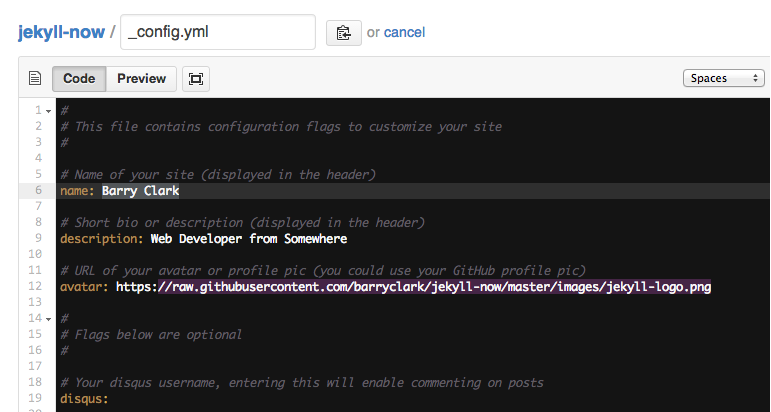
<p><img src="/images/config.png" alt="_config.yml" /></p>

<p>The easiest way to make your first post is to edit this one. Go into /_posts/ and update the Hello World markdown file. For more instructions head over to the <a href="https://github.com/barryclark/jekyll-now">Jekyll Now repository</a> on GitHub.</p>]]></content><author><name></name></author><summary type="html"><![CDATA[Next you can update your site name, avatar and other options using the _config.yml file in the root of your repository (shown below).]]></summary></entry></feed>